
Chevrolet Equinox Owners Manual: Wireless Charging
If equipped, the vehicle has wireless charging in the bin below the climate control system. The system wirelessly charges one PMA or Qi compatible mobile device.
To check for phone or other device compatibility:
- In the U.S., see my.chevrolet.com/learn.
- In Canada, see gmtotalconnect.ca.
- Or, see your dealer for details.
| Warning Wireless charging can affect the operation of an implanted pacemaker or other medical devices. If you have one, it is recommended to consult with your doctor before using the wireless charging system. |
The vehicle must be on, in ACC/ ACCESSORY, or in Retained Accessory Power (RAP). The wireless charging feature may not correctly indicate charging when the vehicle is in RAP. See Retained Accessory Power (RAP).
The operating temperature is −20 C (−4 F) to 60 C (140 F) for the charging system andC (32 F) to 35 C (95 F) for the phone.
| Warning Remove all objects from the charging pad before charging your mobile device. Objects, such as coins, keys, rings, paper clips, or cards, between the phone and charging pad will become very hot. On the rare occasion that the charging system does not detect an object, and the object gets wedged between the phone and charger, remove the phone and allow the object to cool before removing it from the charging pad, to prevent burns. |
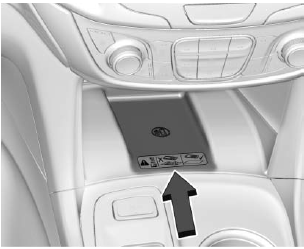
To charge a mobile device:
- Remove all objects from the charging pad. The system may not charge if there are any objects between the phone and the charging pad.
- Place the mobile device face up on the charging pad aligned against the back of the bin.
- The
 will appear on
the
will appear on
the  on
the infotainment display. This
indicates that the mobile device
is properly positioned and
charging.
on
the infotainment display. This
indicates that the mobile device
is properly positioned and
charging.
If does not appear on the
infotainment display:
- Remove the phone from the pad and wait three seconds.
- Turn the cell phone 180 degrees before placing/ aligning the phone on the pad again.
 Power Outlets
The vehicle has three 12-volt
accessory power outlets, which can
be used to plug in electrical
equipment, such as a cell phone or
MP3 player.
There are power outlets:
On the center st ...
 Warning Lights, Gauges, and
Indicators
Warning Lights, Gauges, and
Indicators
Warning lights and gauges can
signal that something is wrong
before it becomes serious enough
to cause an expensive repair or
replacement. Paying attention to the
warning lights and gauges could
...
Other materials:
Air Conditioning Evaporator Core Replacement Evaporator
Air Conditioning Evaporator Core ReplacementCalloutComponent NamePreliminary ProceduresRemove the thermal expansion valve. Refer toAir Conditioning Evaporator Thermal Expansion Valve Hose ReplacementRemove the heater and air conditioning evaporator and blowermodule. Refer toHeater and Air Conditioni ...
