
Chevrolet Equinox Owners Manual: Steering Wheel Controls
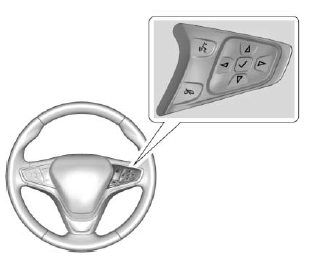
If equipped, some audio controls can be adjusted at the steering wheel.
 : For vehicles with OnStar or a
Bluetooth system, press to interact
with those systems.
: For vehicles with OnStar or a
Bluetooth system, press to interact
with those systems.
See OnStar Overview or Bluetooth (Infotainment Controls) or Bluetooth (Overview).
 : Press to reject an incoming
call or end a current call. Press to
mute or unmute the infotainment
system when not on a call.
: Press to reject an incoming
call or end a current call. Press to
mute or unmute the infotainment
system when not on a call.
 or
or
 : Press to go to the
previous or next menu option.
: Press to go to the
previous or next menu option.
 or
or
 : Press to go to the next or
previous selection.
: Press to go to the next or
previous selection.
 : Press to select a highlighted
menu option.
: Press to select a highlighted
menu option.
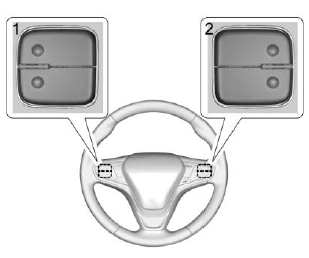
The favorite and volume switches are on the back of the steering wheel.
- Favorite: When on a radio source, press to select the next or previous favorite. When on a media source, press to select the next or previous track.
- Volume: Press to increase or decrease the volume.
 Steering Wheel Adjustment
To adjust the steering wheel:
Pull the lever down.
Move the steering wheel up
or down.
Pull or push the steering wheel
closer or away from you.
Pull the lever up to ...
 Heated Steering Wheel
: If equipped with a heated
steering wheel, press to turn on or
off. A light near the button displays
when the feature is turned on.
The steering wheel takes about
three minutes to start he ...
Other materials:
Crankshaft Balancer Installation Engine Block Cylinder Block Crankshaft
Special ToolsEN 41998-B Crankshaft Balancer InstallerEN 45059 Angle MeterEN 46106 Engine Flywheel Holding ToolFor equivalent regional tools, refer toSpecial Tools.The EN 46106 toolmust be installed onto the flywheel.Use the EN 41998-B installer, nut, bearing and washer to install the crankshaft bala ...
