
Chevrolet Equinox Owners Manual: Driver Information Center (DIC)
The DIC display is in the instrument cluster. It shows the status of many vehicle systems
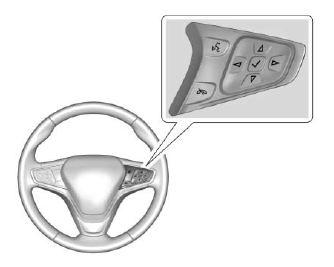
 or
or
 : Press to move up or
down in a list.
: Press to move up or
down in a list.
 or
or
 : Press to move between
the interactive display zones in the
cluster.
: Press to move between
the interactive display zones in the
cluster.
 : Press to open a menu or select
a menu item. Press and hold to
reset values on certain screens.
: Press to open a menu or select
a menu item. Press and hold to
reset values on certain screens.
See Driver Information Center (DIC).
 Cruise Control
: Press to turn the cruise
control
system on and off. A white indicator
comes on in the instrument cluster
when cruise is turned on.
: Press to disengage cruise
control without erasing ...
 Forward Collision Alert (FCA)
System
Forward Collision Alert (FCA)
System
If equipped, FCA may help avoid or
reduce the harm caused by
front-end crashes. FCA provides a
green indicator,, when a vehicle
is detected ahead. This indicator
displays amber if you follow a
v ...
Other materials:
Fuel Pump Cover Replacement Engine Control
Fuel Pump Cover ReplacementCalloutComponent Name1Fuel Pump Cover Fastener (Qty: 3)Caution:Refer toFastener Caution.Tighten10-Y(89-lb-in)2Fuel Pump Cover3Fuel Pump Insulator ...
© 2017-2026 Copyright www.cequinox.com
