
Chevrolet Equinox Service Manual: Brake Rotor Thickness Measurement Disc Brakes Brake Rotors
Warning:Refer toBrake Dust Warning.
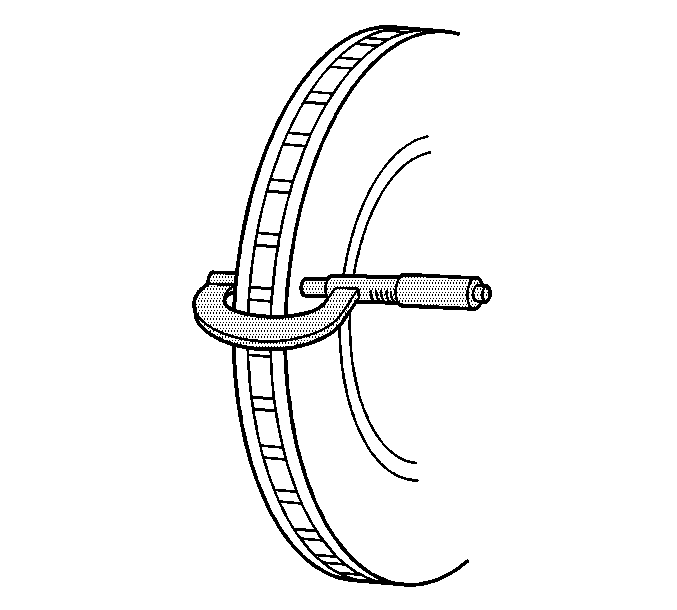
If the inboard friction surface of the brake rotor is notaccessible, reposition and support the caliper with the brake pads.Refer toFront Disc Brake Pads Replacementand/orRear Disc Brake Pads Replacement.Clean the friction surfaces of the brake rotor with denaturedalcohol, or an equivalent approved brake cleaner.Using a micrometer calibrated in thousanths-of-a-milimeter,or ten-thousanths-of-an-inch, measure and record the lowestthickness of the brake rotor at 4 or more points, equally spacedaround the rotor.
Ensure that the measurements are only taken within thefriction surfaces and that the micrometer is positioned the samedistance from the outside edge of the rotor, about 13-mm(½-in), for each measurement.
Compare the lowest thickness measurement recorded to thefollowing specifications:Specification - Front
Brake rotor discard thickness: 27.0-mm(1.063-in)Specification - Rear
Brake rotor discard thickness: 18.4-mm(0.724-in)If the lowest thickness measurement of the brake rotor isabove the minimum allowable thickness after refinishingspecification, the rotor may be able to be refinished, dependingupon surface and wear conditions which may be present.If the lowest thickness measurement of the brake rotor is ator below the minimum allowable thickness after refinishingspecification, the rotor may not be refinished.If the lowest thickness measurement of the brake rotor is ator below the discard thickness specification, the rotor requiresreplacement.
 Brake Fluid Irritant Warning
Warning:Brake fluid may irritate eyes and skin. In case of contact,take the following actions:Eye contact—rinse thoroughly with water.Skin contact—wash with soap and water.If ingested—consult a ...
 Brake Caliper Inspection Disc Brakes Brake Calipers
Warning:Refer toBrake Dust Warning.Inspect the brake caliper housing-(1) for cracks,excess wear, and/or damage. If any of these conditions are present,the brake caliper requires replacement.Inspect th ...
Other materials:
Instrument Panel Insulator Panel Replacement - Right Side (Terrain) Consoles Center Console
Instrument Panel Insulator Panel Replacement - Right SideCalloutComponent Name1Instrument Panel Insulator Panel Fasteners(Qty:-3)Caution:Refer toFastener Caution.Tighten2.5-Y(22-lb-in)2Instrument Panel Insulator Panel AssemblyProceduresDisconnect the electrical connections, if applicable.When replac ...
