
Chevrolet Equinox Service Manual: Overview Entertainment Audio-Visual
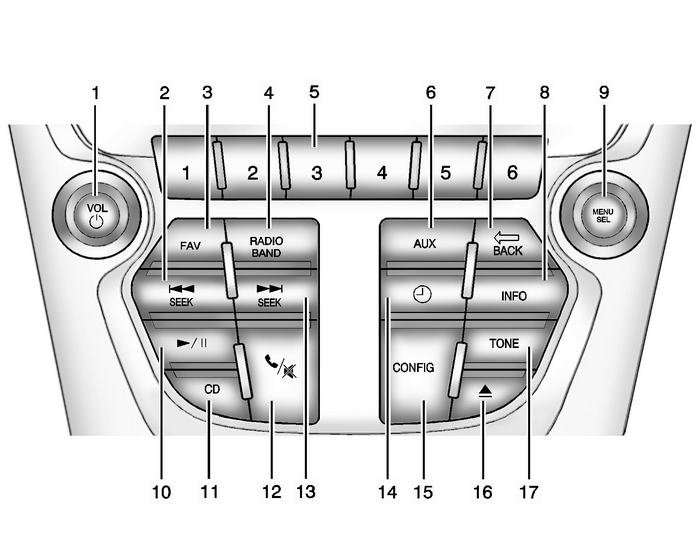
VOL/ O (Volume/Power)g SEEKFAV (Favorite Pages)RADIO/BANDPreset Buttons 1–6AUX (Auxiliary)E BACKINFO (Information)MENU/SEL (Menu/Select)k (Play/Pause)CD Player5 / - (Phone/Mute)l SEEKH (Clock)CONFIG (Configuration Menu)X (CD Eject)TONE
 Electronics
...
 Audio Disc Player and USB Receptacle Replacement Entertainment Audio
Audio Disc Player and USB Receptacle ReplacementCalloutComponent Name1Audio Disc Player and USB ReceptacleProcedureOpen arm rest and using a small flat bladed tool, release thereceptacle.Disconnect th ...
Other materials:
Secondary Timing Chain Tensioner Removal - Right Side Valvetrain Valvetrain Timing Timing Belt Tensioner
Remove the right secondary camshaft drive chain tensionerbolts.Remove the right secondary camshaft drive chaintensioner.Remove and discard the right secondary camshaft drive chaintensioner gasket.Inspect the right secondary camshaft drive chain tensionermounting surface on the right cylinder head fo ...
© 2017-2026 Copyright www.cequinox.com
